Marine Form Automation
Crewing teams retype the same seafarer details out of CVs, passports and certificates into every joining form. MFA reads the documents once and fills the forms.
- Product Designer (sole)
- 2026
- Maritime crewing · document extraction
- In production with clients
01Context
3S builds software for shipping companies, and crewing is the document-heaviest corner of that business. Hiring a seafarer means collecting a stack of documents, a CV, a passport, STCW certificates, medical and flag-state paperwork, and producing a second stack of forms from it, each wanting the same facts in a different arrangement.
The work needs accuracy more than judgement, and it was being done by hand.
02The problem
A crewing officer opens a CV, reads a name, a rank and a certificate number, and types each into a joining form, then into the next form. The same details off the same document, several times per hire, with a chance to transpose a digit each time. For a Master, the rank carrying the most certificates, assembling one candidate's forms took about an hour.
Certificate validity lived where it lives at most operators: a spreadsheet someone remembers to check. These documents go to regulators, and a wrong certificate number on a flag-state submission is a compliance failure.
03How it works
Documents go in as a batch, in whatever format they arrived. The system classifies each one, extracts the structured data, checks validity and expiry, and attaches everything to the right candidate. From there you describe the person you need in plain language, pick the forms, and they come back filled.
The pipeline was an engineering problem. The design question was what the operator is shown at each stage, and how the system reports what it is unsure about.
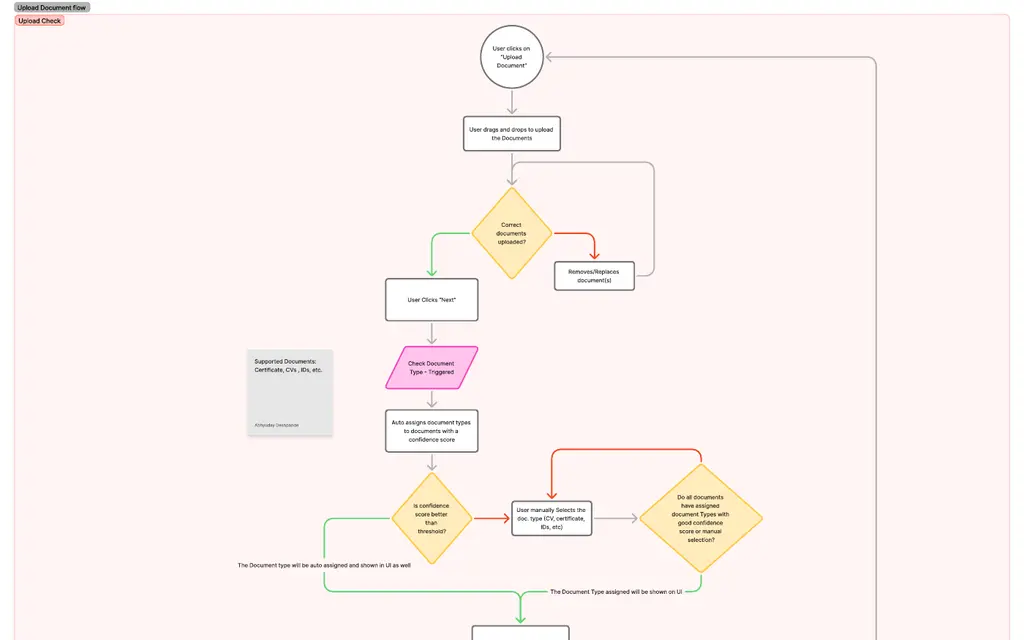
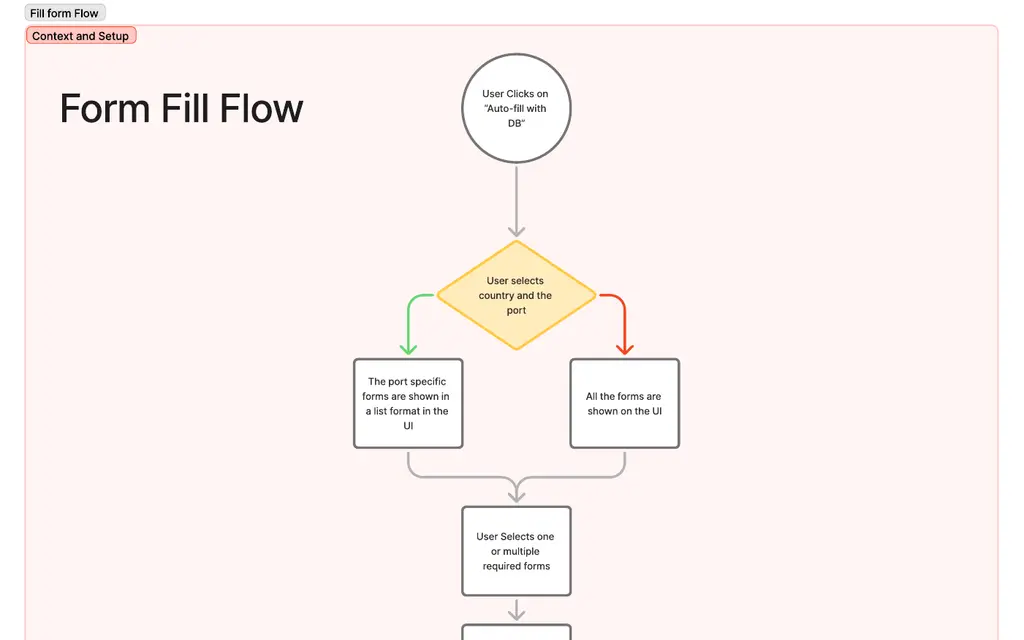
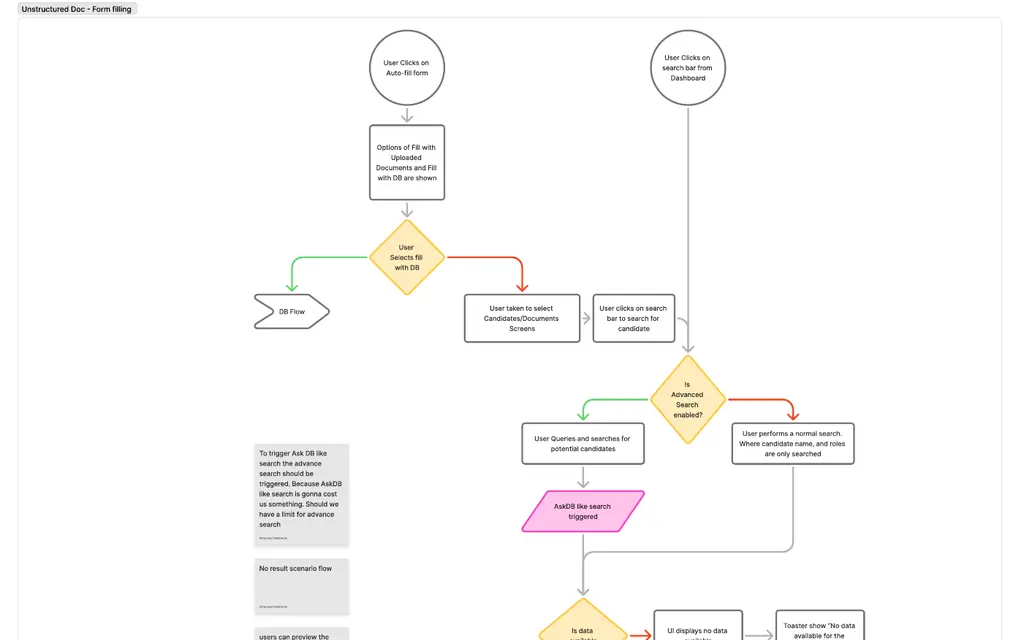
I mapped three flows before designing any screen: documents coming in, filling a form with structured data, and filling one with unstructured data. Each covers every step, including what happens when a document fails.
These are those first versions, and they did not come through review intact, which is what mapping them early was for. I walked them with the CTO and the engineering team. Parts of what I had drawn were expensive or awkward to build, and one stretch of the flow had a simpler shape than the one I had given it. I revised on both counts before any screen was designed, and engineering built from the revised set.
The revised flows are not public, and neither are the specifics of what changed.
04What I decided at ingest
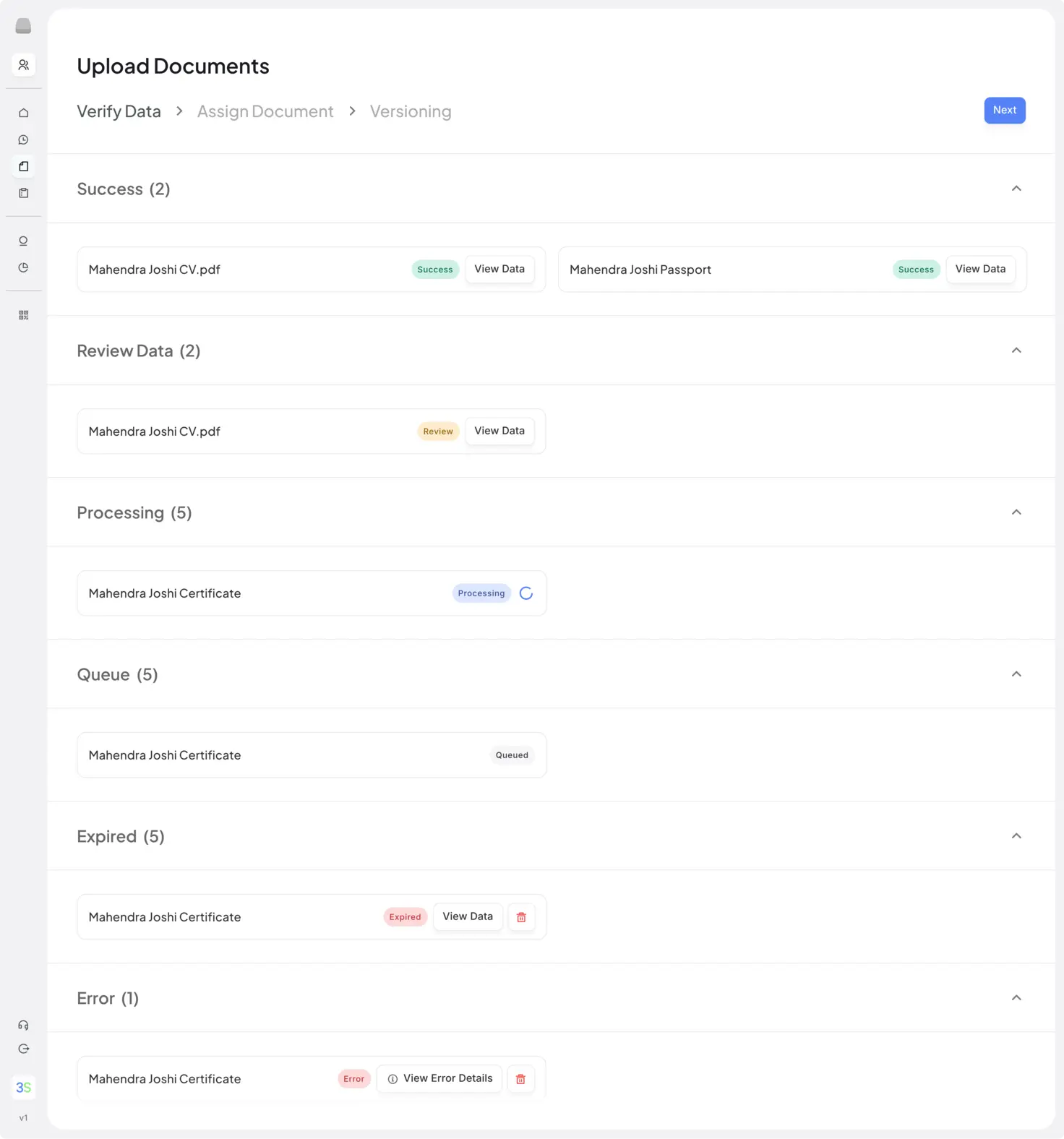
A confidence score becomes a status before it reaches the screen. Extraction produces a number. The screen shows success, review or error, where review means the number fell under a threshold we set. A percentage is not an instruction: to one officer 84% means look at this, to the next it means fine, and both are reading the same document. A status says which it is, once, for everybody, and where the threshold sits becomes the product's decision to defend rather than an individual's.
Rejected Showing the percentage beside each document and letting the operator judge.
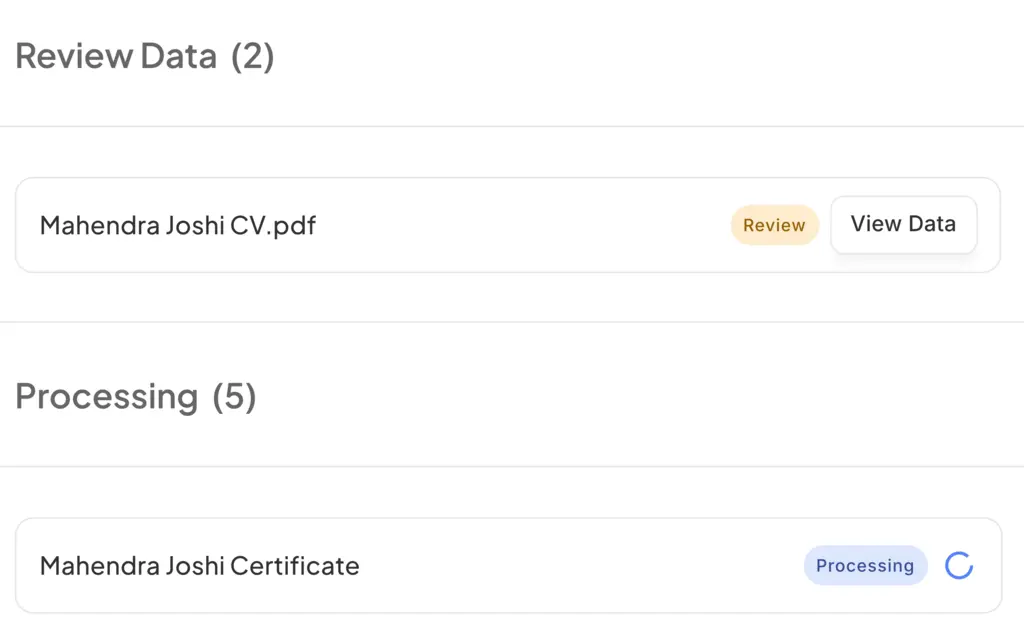
A document that arrives twice is a version, not a duplicate. Seafarers re-send updated CVs constantly, and the superseded file still matters: a certificate number that changed between two versions is exactly what an audit asks about. The system records the new upload as a version and offers the two side by side.
05The candidate search agent
A manning company walked us through how they find people. A client sends a requirement: a rank, an engine type, a certificate, a minimum sea time. Somebody then narrows thousands of records down with filters, rank in one place, certificates in another, sea service in a third, holding the requirement in their head across four screens and doing it again for the next one.
The agent takes the requirement in plain language, and hands the shortlist straight to the forms. Crewing teams look for people in the words the client sent them, not by record ID or filter state, and the structured extraction is what gives that sentence something to resolve against. Selection then happens in the answer itself, so nobody carries a name out of one screen and into another.
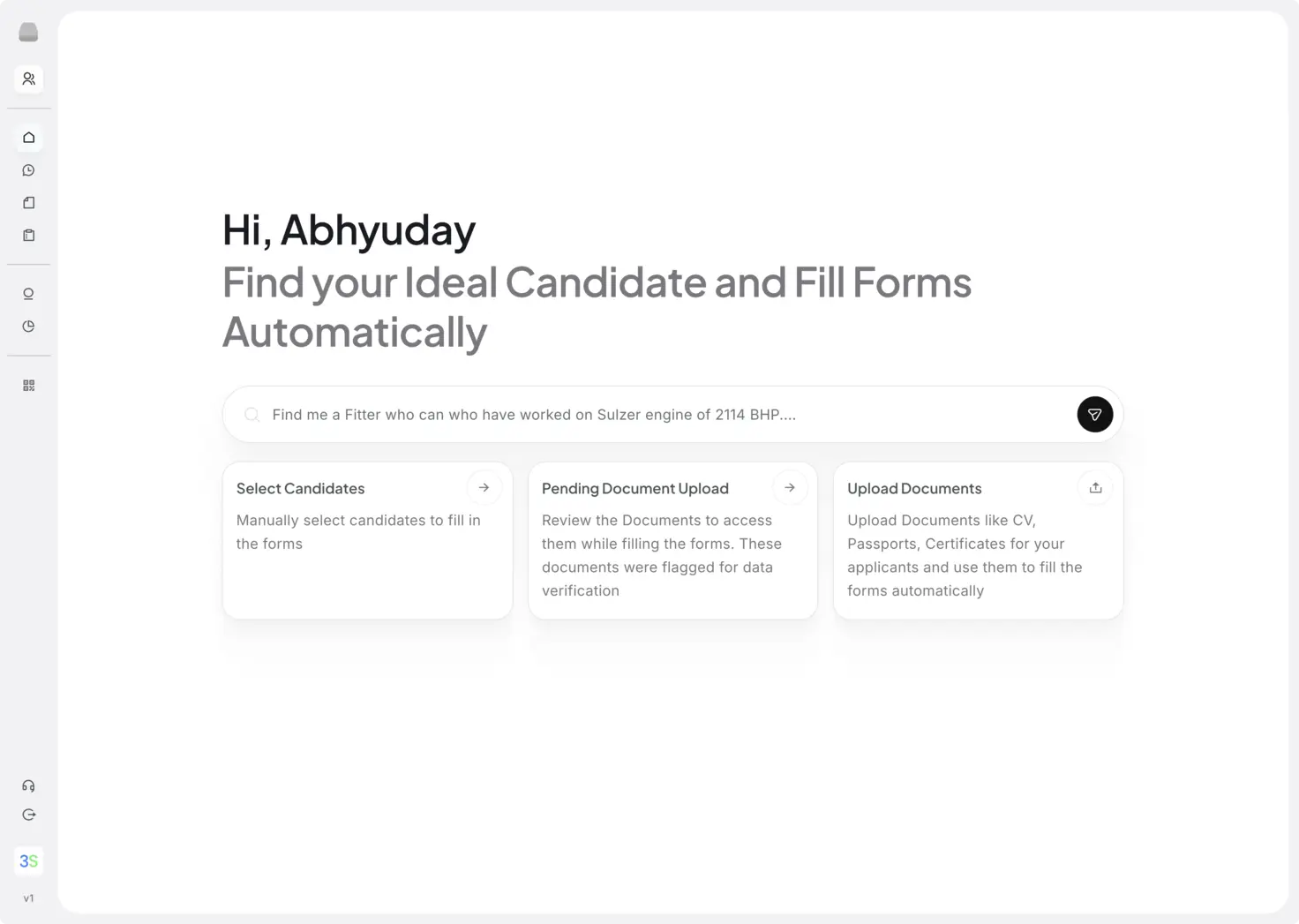
Rejected A row of dropdowns: one for rank, one for certificate, one for date. Cheaper to build, and already what they had. It also means learning where the system keeps each thing before you can look for anybody.
The answer comes back as a profile, with every certificate's expiry already checked. Ask for a Master with five years on oil tankers, valid STCW, and the reply gives rank, availability and last sign-off, sea service in months and contracts, a breakdown by vessel type, then the certificates read out of the documents with their dates: STCW valid to 2027, medical expired 11/25. The validity that used to live in a spreadsheet is attached to the record at extraction, so it sits in front of the operator at the moment they are deciding whether to send this person to the client.
06What happens to a missing field
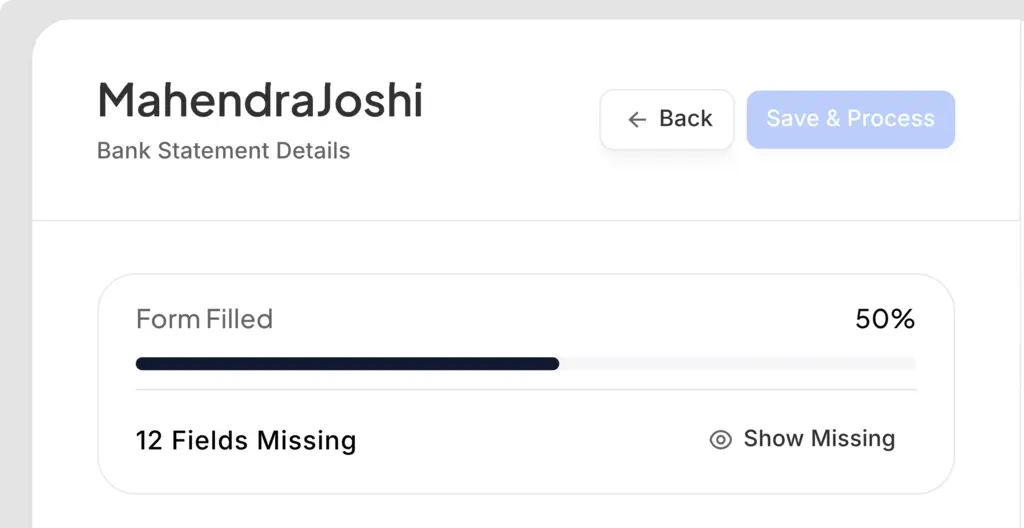
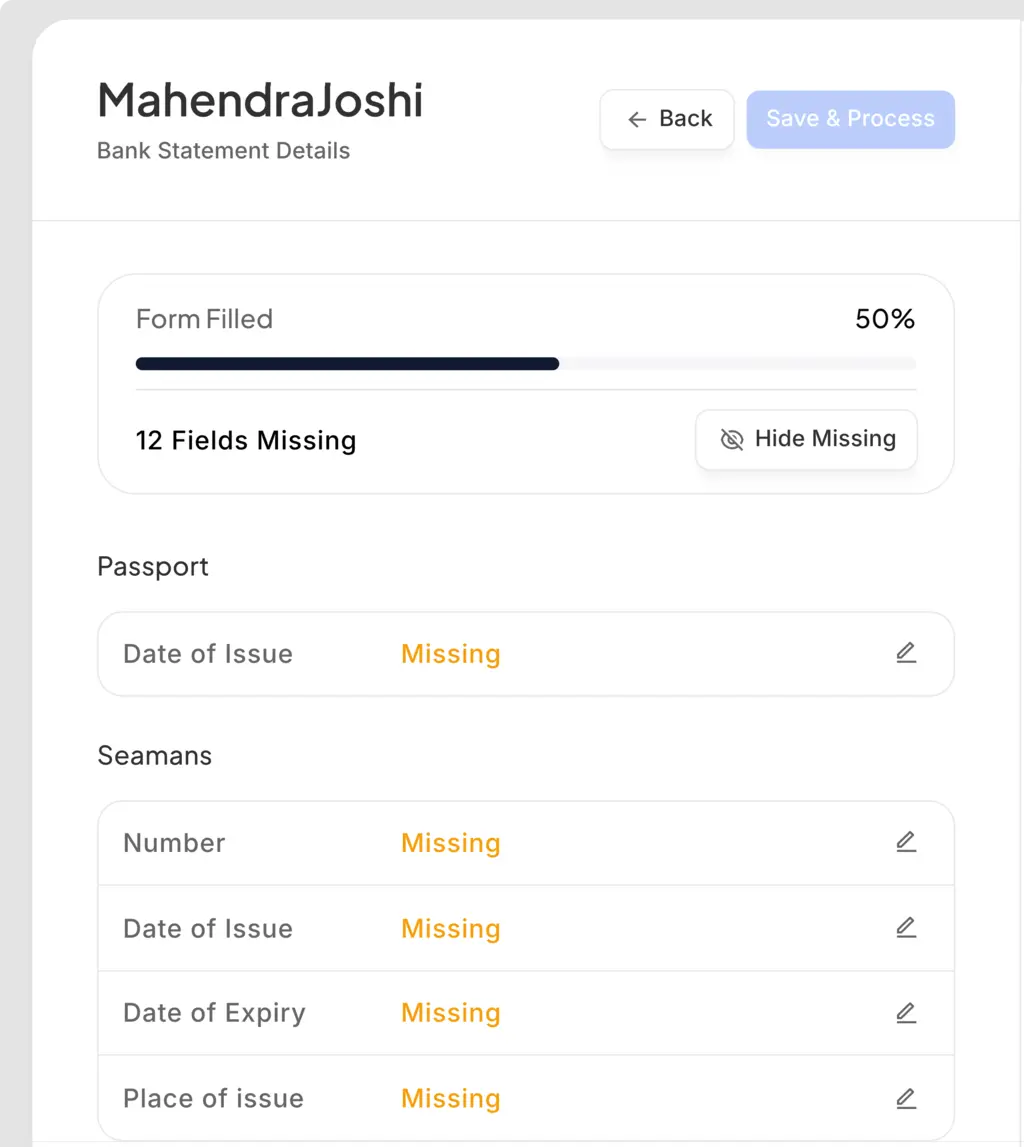
Missing fields are flagged, and the form still exports. Refusing to export an incomplete form strands the operator on something they can neither finish nor leave, because the missing certificate is with the seafarer. The form exports with its gaps marked. In the form itself the gap is simply empty; an operator who wants to close it opens the filled form and switches to the missing fields.
A gap the operator fills is stored on the candidate, not on the form. Type a seaman's number into one form and it is written to that candidate's profile, and the next form asking for it is already filled. Forms in this business overlap heavily, arranging the same twenty facts twenty ways, so this is the difference between filling a gap once and filling it once per form. The record gets more complete as the forms get filled, so the operator doing the tedious work is the one who stops having to do it.
Rejected Saving the value into the form being filled, and asking again on the next one.
07Outcome
I designed the product: ingest and classification, the candidate profile, the search agent, form selection and filling, candidate self-upload, and the public landing page. Then I built the working prototype in Next.js myself, so engineering implemented against something running rather than a static file, and the empty, error and slow-upload states were answered before they came up. I stayed with it through production and ran design QA with the dev team up to release.
MFA is in production and live with clients. Assembling a Master's forms by hand took about an hour; the same work, from documents uploaded to forms filled, now takes at most five minutes. A Master carries more certificates than most ranks, so that is the demanding end of the range, not a flattering one.
- An hour of retyping to under five minutes
- In production with clients
- Designed and prototyped in Next.js, then QA'd through release